In most instances of a logger not displaying any lights the fault is not with the logger itself but the board the logger is connected to. This is caused by a failure of capacitor C9 which stops power from passing through from the inverter to the logger.
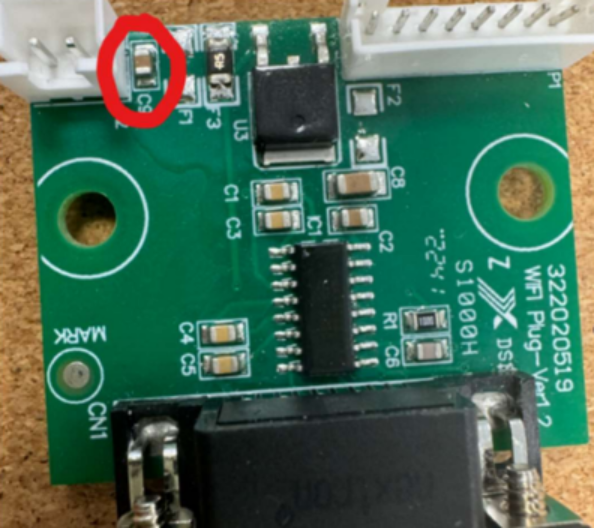
To confirm if capacitor C9 is faulty you can measure the voltage across the capacitor. You should receive a voltage of 9-12V.
If no voltage is received the capacitor has failed.
You can remove the capacitor from the board to restore operation to the logger. To do this you can use some snips or a flat head screwdriver. Shown below:
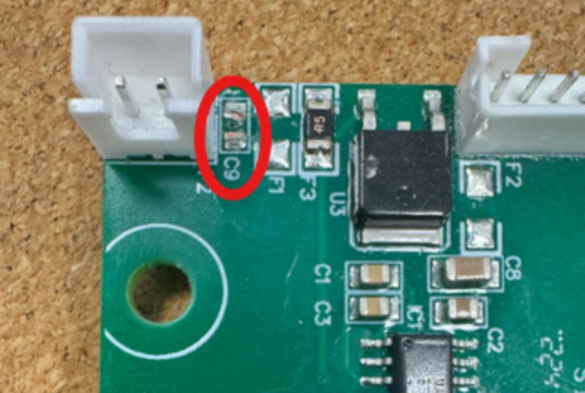
This is a non-essential component and removing this allows the logger to resume operation. If the removal of the capacitor doesn't work or there is voltage across the capacitor and there are still no lights on the logger, we can then assess for a logger fault.
If you are not comfortable with the removal of this capacitor but have verified a fault with this board by checking the voltage, we can arrange a replacement board to be delivered or an inverter repair to take place in our service centre.
PDF Copy attached
Was this article helpful?
That’s Great!
Thank you for your feedback
Sorry! We couldn't be helpful
Thank you for your feedback
Feedback sent
We appreciate your effort and will try to fix the article