When NOT connected to an Inverter (Power Cables and BMS), also that there are no BMS Interconnect Cables connected between the Batteries, if any of the DIP switches are set to the Up, On, 1, position it will send the battery into fault.
EG
The Red Fault LED will flash ON slowly approx every 4 - 5 seconds and with a digital voltmeter, the Battery Voltage will only read around 16V across the Battery Terminals.
Turn the Battery OFF and set ALL of the DIP Switches to the Off, Down, 0, position then turn the Battery On again and the fault will have cleared and the Voltage reading will now read correctly. The Battery should now be able to power up the Inverter ok, which should go into Normal on Battery Power ONLY after approx 5 minutes.
For multiple Battery Systems, the Batteries can now be powered OFF, the Master Battery BMS can be reconnected to the Inverter BMS / CAN Port and the BMS Interlink Cables from Master to Slave1, to Slave2, to Slave3 etc can be reconnected using the correctly configured SSLB1 CATL BMS Cables as per the below article "SSLB1 Battery Communication Cables"
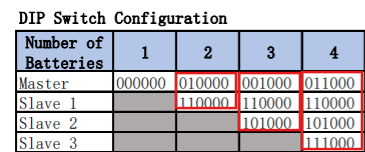
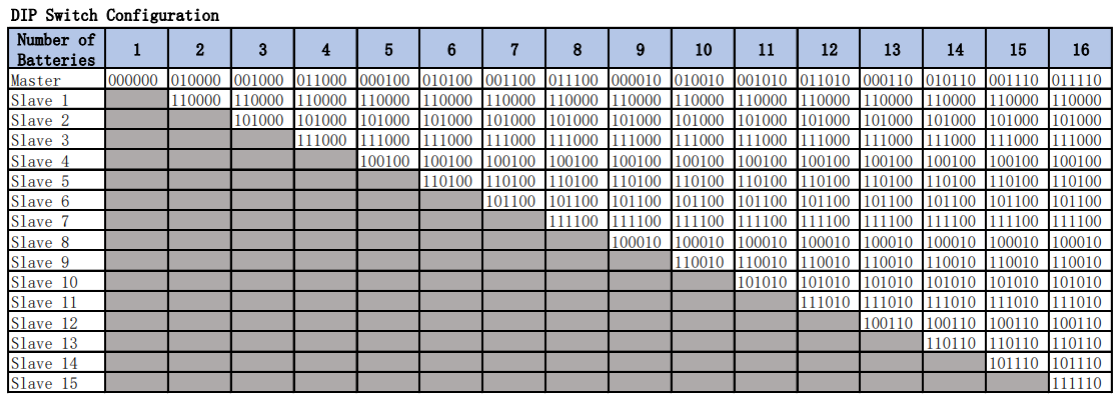
The Parallel Batteries can then be reconfigured as Master, Slave1, Slave2, Slave3 etc and their DIP Switches must be set as per below DIP Switch Configuration Chart and article
https://support.sunsynk.com/en/support/solutions/articles/103000400804-sslb1-dip-switches
Was this article helpful?
That’s Great!
Thank you for your feedback
Sorry! We couldn't be helpful
Thank you for your feedback
Feedback sent
We appreciate your effort and will try to fix the article