If you are not seeing any house load on your Sunsynk inverter this article will outline some steps to troubleshoot this issue. Without accurate load readings the system will behave incorrectly. You can check the load readings in your system flow by pressing the bar charts on the left side of the home screen or by selecting the AC Load dial and checking the Grid Power tab.
CT Placement
Whether you are using a CT directly or using third party metering equipment (such as Eastron, Owen Brothers, Chint meters etc.) the corresponding CT should always be placed on the live incomer of the property before any henley blocks, distribution boards etc. so that the inverter can read the full load demand as well as import and export before they come in/out of the property.
If there are any other CTs sited nearby such as for EV chargers, solar diverters etc. they should be placed 12 inches apart from each other to avoid interference. If this is not possible try to keep them separated as much as possible.
The CT cables should also not be coiled and kept as far as possible from any other live cables or data cables which can cause interference and even completely block the signal from reaching the inverter.
If using the CT supplied with your Sunsynk inverter the arrow on the CT coil should be pointing away from the grid towards the inverter.
CT Connection
If using a CT directly (no Eastron, OBM etc.) check your user manual to make sure it is connected to the correct ports in the grey connector strip (usually white cable into port 3, black cable into port 4) and ensure the connections are tight at both ends.
If using an Eastron, OBM etc. as an external meter ensure that you have 'External Meter for CT' enabled in the Advanced Settings and have the correct meter selected - if you are not getting a W04 Meter Comms fail fault then check the readings on the screen of the external meter itself and ensure it is reading correctly. There could be a configuration issue if the original setup was not done correctly, please see some of our Eastron guidance articles in our Knowledge Base for more information.
Firmware Updates
Some firmware updates can resolve issues with CTs not reading properly if the inverter is running firmware pairings which are incompatible. Even if they are up to date refreshing the firmware can also start the CT reading properly again.
System Mode
If your system work mode is set to Zero Export + Limit to Load Only mode it will only provide power to any essential loads connected to the inverter's load terminals.
If you are in Selling First mode this will prioritise exporting the batteries and selling back to the grid - without the new 'CT Connected' option enabled in the power flow on Sunsynk Connect then it will ignore any CT readings. If you enable this option then you should be getting load readings in Selling First mode.
Grid Relay
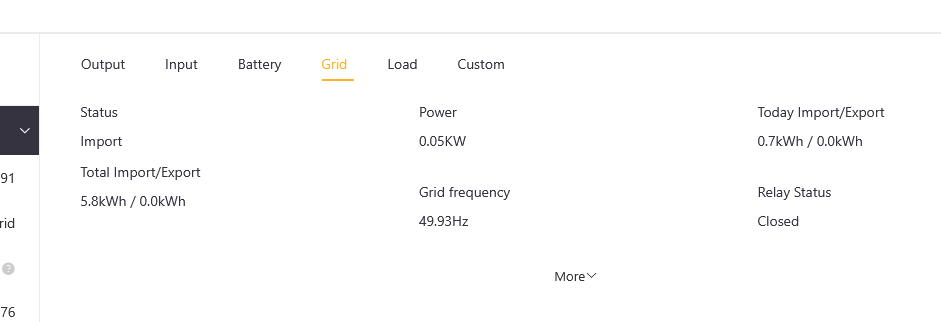
If you are having issue with your grid voltage or grid frequency it can prevent your grid relay from disconnecting and this will stop any house load readings as the power will stop flowing and the CT will not be able to take measurements. You should notifications of the grid relay disconnecting on your app, but you can check this on Sunsynk Connect in the Equipment tab under the Grid tab on the right hand side. Closed means the relay is connected and open means that it is disconnected.
If you are experiencing issues with the grid relay please see the Grid Relay Troubleshooting article in our Knowledge base.
Was this article helpful?
That’s Great!
Thank you for your feedback
Sorry! We couldn't be helpful
Thank you for your feedback
Feedback sent
We appreciate your effort and will try to fix the article