Dear Lifelynk Customer,
As requested, we have checked your settings and adjusted them for a standard domestic Lifelynk System.
However, we do not know if individual End Users have an agreed Overnight Low Tariff Import agreement with their Energy Supplier to be able to charge your Battery from Grid overnight.
If you do have such a Low Import Tariff, then the instructions below will enable you to set an Overnight Grid Charge in your System Controller Settings.
- Press the Settings / Select Button to select the Home Settings menu

- Use the Down Arrow to Highlight the ‘Advanced Settings’ then Press the Select Button
- Use the Down Arrow again to highlight the ‘System Controller’ then Press the Select Button
- You will now see a Table of four Timer Settings. Overnight Grid Charge must be set on Timer 1
- The default time is midnight to 6.00am (00.00 – 06.00) so if your Low Import period is say 1.00am to 5.00am for example….
- Press Select to Highlight Timer 1 (1 turns Red) then use the Up/Down arrows to select the DIGIT that you wish to change 00.00 to 01.00 for the Start Time and repeat for the Stop Time 05.00
- Then using the Select and Up/Down Buttons set the desired Grid Power, then set the SOC value to 100% then Set the Charge setting from N to Y
- Press the Home / Back Button
 to exit and use the Up/Down Arrows then the Select Button to highlight YES to save these new Timer Settings to Charge from Grid.
Further, we understand that you may be unsure of how your settings are setup for your Inverter, particularly in respect of the Solar Sell option.
This setting is NOT able to be set remotely as most other setting options can. However, it can be set using the Display and control buttons of your Lifelynk Inverter.
Please see the attached instructional video which guides you through the menu settings on your Display to the System Config options.
At the bottom of these options and as per the video, you will see ‘Solar Sell’. If there is a Black Dot in the Yellow Circle next to the option then it is Enabled.
If you do not see a Black Dot, but just the Yellow Circle then follow the rest of the video which shows you how to enable this feature, then Exit and Save (YES) to save the change you have made.
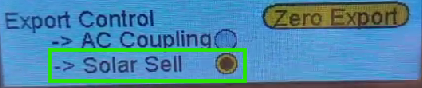
If your System Controller Display DOES NOT show the ‘Solar Sell’ option (or feature) then please request a firmware update to your Lifelynk by emailing support@sunsynk.com
Kind regards,
UK Technical Support Team
+44 (0)151 832 4300
Was this article helpful?
That’s Great!
Thank you for your feedback
Sorry! We couldn't be helpful
Thank you for your feedback
Feedback sent
We appreciate your effort and will try to fix the article