System Mode Settings (Portal)
Work mode:
Selling first: Sends everything back to the grid (Solar, batteries, micro inverters…)
Zero export + Limit to Load only: Does not allow export to the grid and only covers what is connected to the UPS port (load output port)
Limited to home: Zero export but covers UPS and non-essentials. Allows excess solar to charge the batteries.
Solar export: Allows excess power to go back to the grid once the batteries are full or already charging at maximum set current. If solar export is selected, the inverter will prioritize using the excess solar for battery storage and will pull the inverters self-consumption from the grid.
 Use timer: Unlocks the 6 available timers to charge batteries from grid/generator or to let them discharge. This timer is a 24-hour timer, and each time must follow the one before. The first timer cannot be set before midnight, and the last timer cannot be set after midnight.
Here we will tick the times where the batteries will charge from the grid or from the generator.
 To use the timers, you need to activate the corresponding option in the battery settings, Grid charge and Grid signal or Gen charge and Gen signal, otherwise nothing will happen.
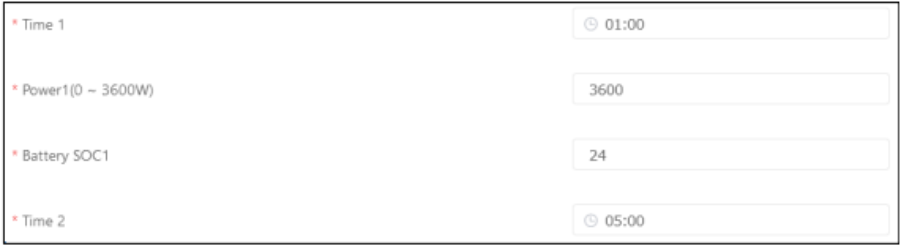
In this case, “Time 1” has not been ticked, which means that from 1 am to 5 am the batteries will discharge down to 24% when the PV cannot cover the load and they will be charging from the excess PV.

Power: The maximum power that batteries will charge or discharge. This normally does not change unless instructed to by the installer or Sunsynk.
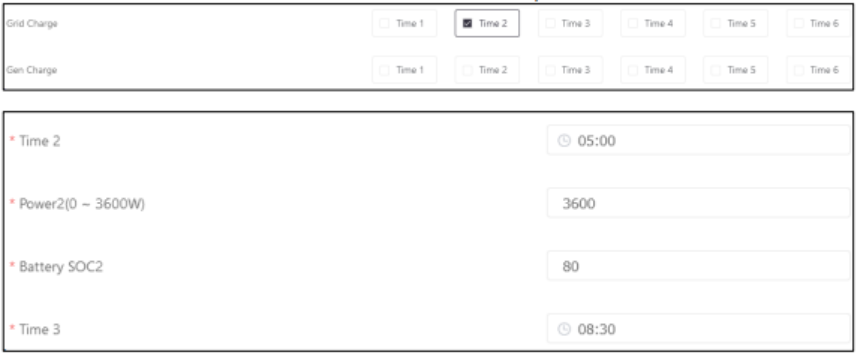
In this case, “Time 2” has been ticked in the grid charge option, which means that from 5 am to 8:30 am the batteries will charge from the grid up to 80%.
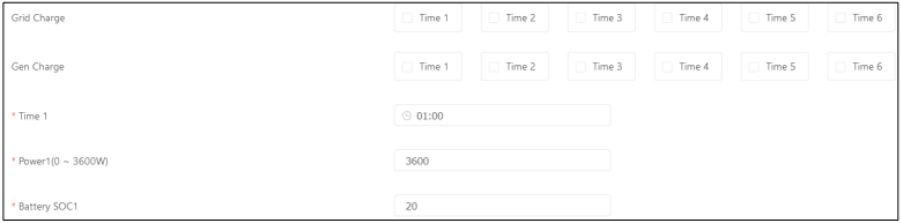 In this case, no timers have been selected and the Grid signal and grid charge, as well as Gen signal and Gen charge have not been selected too. Also, in each timer (even though the picture shows only the first one) the batteries’ SOC has been set to 20%. This can be useful when you do not want to charge from the grid, nor the generator and you want to let them discharge throughout the day. With this, the batteries will also charge automatically from the excess solar.
Max sell power: Maximum number of Watts that will be sent through the grid.
Energy pattern: Can prioritize battery charging or load (load is recommended). This has rules:
If priority load is selected the batteries will automatically charge from the excess solar once the load has been covered. You do not need to set this in the timer.
If priority load is selected and batteries are set to charge to 100% in the timer from Grid or Gen, the batteries will remain at 100% until the end of the selected timer, meaning that power will not go to the load until the next time starts.
If priority load is selected and the batteries are set at 100% in the timer, but no Grid or Gen charge options are ticked, the batteries will remain at 100% until the end of the selected timer, meaning that power will not go to the load until the next time starts.
If priority battery is ticked, you must select a time during the day for the battery to be prioritised over the load. For example: If I set time 3- 12:30 and Time 4- 16:30 and set the SOC to 100% with no Grid or Gen options ticked, priority battery will charge the batteries to 100% between these times without covering the load, unless solar production is higher than the batteries set charge current. Before this set time, and after this set timer has finished, the inverter will prioritise load again.
Grid trickle feed:
Must not be set under 20W and does not need to be set any higher.
This allows us to monitor the CT coil.
Stops pre-paid meters from tripping.
Allows the inverter to use the trickle feed for self-consumption.
What you see being pulled in from the grid may vary due to the inverter self-consumption (between 20W and 85W).
Was this article helpful?
That’s Great!
Thank you for your feedback
Sorry! We couldn't be helpful
Thank you for your feedback
Feedback sent
We appreciate your effort and will try to fix the article