This article provides some supplementary information specifically for troubleshooting a W04 fault when using the OBM-LoRa0223 wireless bridge. For generic W04 troubleshooting please see the below article:
Using the OBM-LoRa-223 wireless bridge alongside an OBM-115 meter will allow you to extend the distance from the CT in the same way that you would use a CAT5/6 cable with a wired OBM115 meter or an Eastron meter.
Interpreting the Display
Screenshot from technical manual
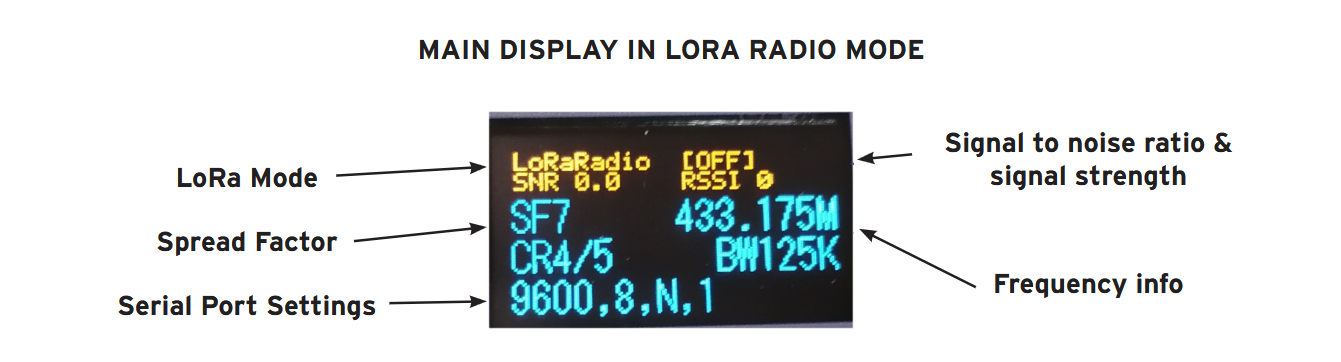
Values
SNR
Signal-to-noise ratio showing the ratio of useful data being received to background noise. Ideally this will be a positive value, but it is normal to see it as negative. Anything within or near to the property which emits radio frequency signals can cause interference such as garage door openers, smart home devices etc. Below is an overview of what the readings mean.
> 0 dB to +10 dB (Excellent): The signal is stronger than the noise floor. You will have a highly reliable connection without packet loss.
-10 dB to 0 dB (Acceptable): The signal is at or slightly below the noise floor, but LoRa's error correction can typically handle it. You may occasionally drop a packet, but continuous data transmission should remain functional.
< -15 dB to -20 dB (Critical/Unreliable): The signal is severely degraded. While the radio chip boasts a sensitivity down to -139 dBm, an SNR this low means you are likely on the absolute limit of your range or experiencing heavy radio interference.
The signal is bidirectional so it is normal to see slightly different values when looking at both screens, but typically this difference should be very minor.
RSSI
Received Signal Strength Indicator - this is measured in decibel-miliwatts (dBm) and will always be a negative value. Below is an overview of what the readings mean.
-30 dBm to -67 dBm (Excellent): The strongest possible signal, often seen when the transceiver units are relatively close together.
-67 dBm to -80 dBm (Good / Reliable): The optimal target for continuous, reliable data packet delivery for industrial ModBus / RS485 connections.
-80 dBm to -90 dBm (Marginal / Weak): The bare minimum for basic connectivity. At this stage, you may experience occasional packet loss or slower response times.
-90 dBm to -120 dBm (Unusable / Borderline): At the edge of the receiver's sensitivity. While LoRa can occasionally demodulate signals lower than -120 dBm, you are likely to lose connectivity
Similarly to the SNR values, the signal is bidirectional so it is normal to see slightly different values when looking at both screens
.
Line of Sight
The best way to keep a strong signal strength is to have a direct line of sight between the transmitter and receiver, particularly over long distances. This is the most common cause of W04 faults when using the LoRa bridge. The signal strength will be even more impacted more by any metal objects between the two receivers.
If the signal does drop out completely then the inverter will go straight into the W04 fault again because it has lost the readings from the CT which is used to control export. As soon as the signal is re-established the W04 fault will clear.
LoRa Mode
As per the instructions in the manual these are typically set up in LoRaRadio mode which you should see in the top left corner of both screens. If the SNR and RSSI values are still showing poor signal strength or strong interference from background noise the impact the signal may be improved by switching to PMAC protocol (please refer to the technical manual for instrcutions on how to change this). Technically this should not make a significant difference to external interference but we have seen it result in slightly better signal strength readings.
Was this article helpful?
That’s Great!
Thank you for your feedback
Sorry! We couldn't be helpful
Thank you for your feedback
Feedback sent
We appreciate your effort and will try to fix the article