It is possible to use the three-phase meter Eastron SDM630MCT, with our single-phase inverters. Please note that this guide is based on the Eastron CT clamp version, SDM630MCT. Another compatible three-phase meter model is the SDM630MCT v2; connection remains the same, but settings on the device vary (please refer to SDM630MCT vs. SDM630MCT v2 for these differences).
Step 1 – Connect Power to Eastron
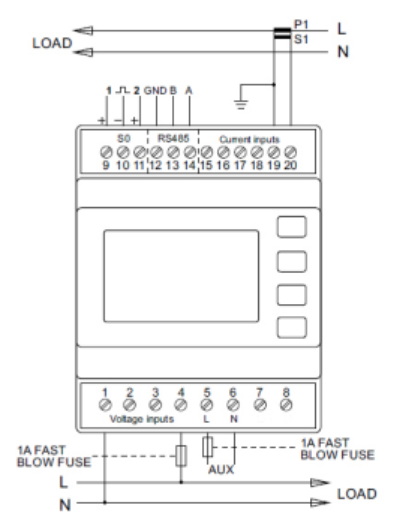
As per the above diagram, you’ll need to create a bridge from connection 5 labelled LA to phase 1 (connection 4) and create a bridge from connection 6 labelled NA to the neutral (connection 1).
Step 2 – Connect the CT Clamps
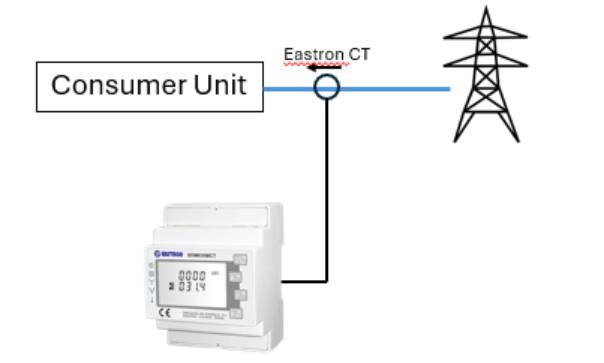
On the Live tail from the incoming supply between the Meter and the consumer boardThe CT clamp has an arrow that MUST face towards the loads (consumer unit).
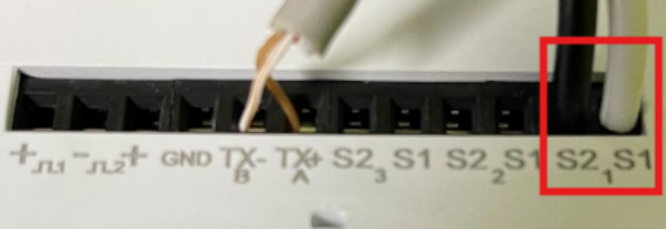
The white cable should then be connected into S11 and the black cable should be connected into S21.
Step 3 – Cable from Eastron to the Inverter
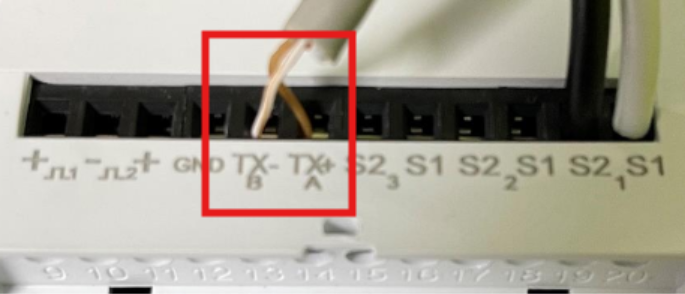
Using one end of the data cable CAT 5/CAT 6 – Choose which solid coloured cable (eg Brown) to connect into TX+A (connection 14) and choose its opposite Colour / White cable (eg Brown/White) and connect to TX-B (connection 13).
Using the other end of the data cable CAT 5/CAT 6 – Create connections on Inverter side, please see pin out connections in the diagram below. Pin 4 = 485-B and Pin 5 = 485-A and plug RJ45 into Meter/RS485 Port.
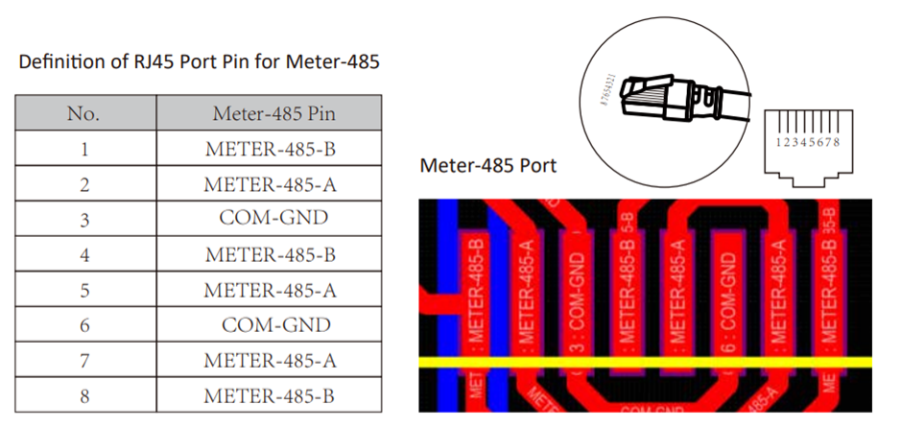
This definition applies to the 3.6kW and 5kW Ecco inverter units. Pin out definitions for your specific inverter model can be found in the manual.
Step 4 – Settings on the Eastron
When setting up the unit, some screens require the number entering. On entry to the setting up section, a password must be entered. Digits are set individually, from left to right. The procedure is as follows:
1) The current digit to be set flashes and is set using the  and
and  buttons
2) Press  to confirm each digit setting. The SET indicator appears after the last digit has been set.
3) After setting the last digit, press  to exit the number setting routine. The SET indicator will be removed.
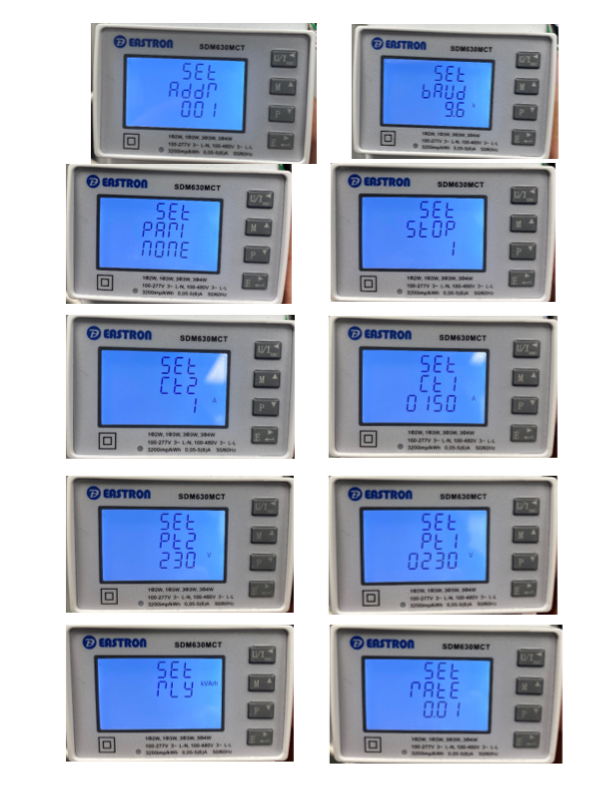
To enter set-up mode, press the  button for 3 seconds, until the password screen appears. The password is 1000.
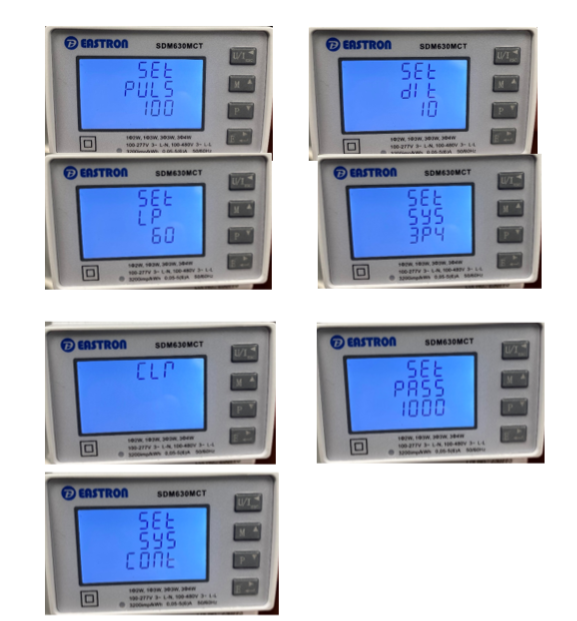
Please follow the settings below and change where needed to meet the same values as shown (These settings are for the supplied 15A/1A CT clamps; CT1 and CT2 will need to be changed accordingly if a different sized CT is used). CT ratio settings can only be set once – if further changes are required, you will need to contact Eastron for an override password.
Step 5 – Settings on Inverter
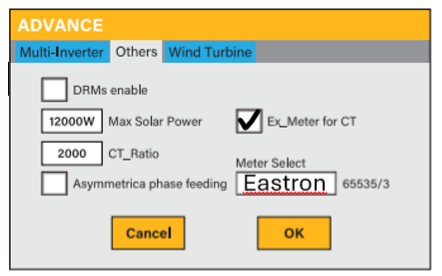
Go into the Settings page and select Advanced Settings and select the ‘Others’ tab.
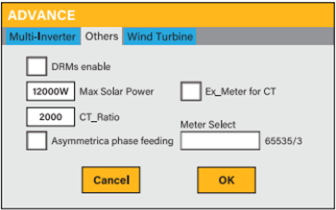
Select Ex_Meter for CT and select Eastron 3P in the drop-down ‘Meter Select’ menu.
Step - 6 – Connection Success/Fail
If communication is successful, you will now see an AC Load on the inverter. If the connection fails, you will receive a warning ‘W04_Meter_Comm_Fail’. Please refer to (W04 troubleshooting documentation) if the W04 alarm persists.
Was this article helpful?
That’s Great!
Thank you for your feedback
Sorry! We couldn't be helpful
Thank you for your feedback
Feedback sent
We appreciate your effort and will try to fix the article