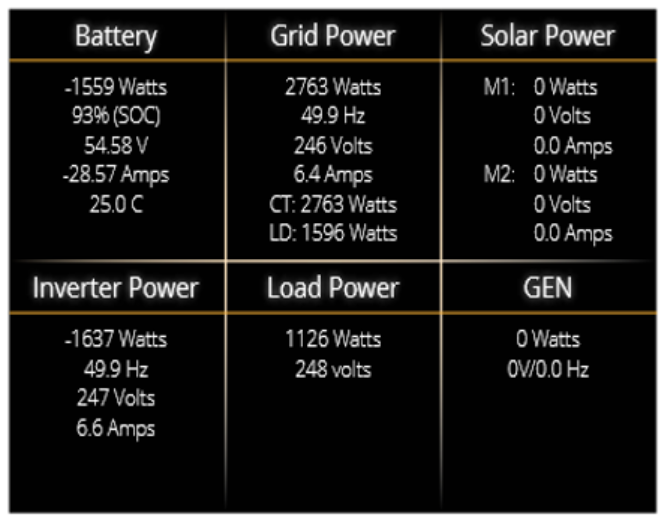
The AC Load screen provides a real-time overview of power flow across all major system components, including the battery, grid, solar PV input, inverter output, connected loads, and generator. This page is designed to give users a full picture of energy usage and system performance. To access this page, tap the "AC Load" dial on the Home Screen.
COLUMN DESCRIPTIONS
1. Battery Column: Displays total power from the battery, including SOC, voltage, current, and temperature.
- A negative value indicates discharge.
- A positive value indicates charging.
- Temperature reads 0°C if the sensor is disconnected.
- Displays internal temperatures from DC transformer and AC heatsink.
- Values turn red at ≥90°C.
- Performance begins degrading at 110°C and shuts down automatically for safety.
2. Grid Column: Shows power exchange with the grid.
- Positive = importing power, Negative = exporting power.
- Displays frequency, voltage, current, and CT coil value.
- If PV is disconnected but power is still supplied from the grid, check CT coil polarity.
3. Solar Column (MPPT 1 & 2): Shows solar generation statistics for each Maximum Power Point Tracker.
- Includes power, voltage, and current per MPPT input.
4. Inverter Column: Displays inverter output power, frequency, voltage, and current delivered to the system.
5. Load Column: Shows the total load power (W) and load voltage (V) drawn from the inverter.
6. GEN Column (Generator): Displays power output, voltage, and frequency of the connected generator (if active).
Was this article helpful?
That’s Great!
Thank you for your feedback
Sorry! We couldn't be helpful
Thank you for your feedback
Feedback sent
We appreciate your effort and will try to fix the article