In certain configurations when charging your EV, the Sunsynk system will see this charge as a load and discharge your storage batteries to support this, essentially using one battery to charge another. This is not always a sufficient solution and there are two ways this can be avoided.
Method 1 (Using the Inverter Settings):
In the time of use settings, for the period you wish to charge your car set the battery target SOC to 100%, or you can set the battery to charge in this window.
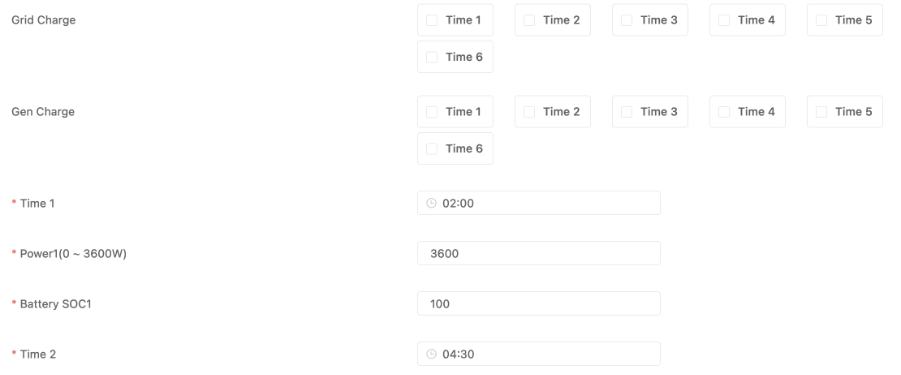 This will stop the batteries discharging during this period.
This will also however stop the batteries from discharging to other property loads during this time.
If you wish to still discharge to property loads you will need to reconfigure the system according to method 2.
Method 2 (Changing the System Wiring):
This method will stop discharge from the batteries to the EV charger regardless of the time of day, whilst also allowing for the batteries to continue to discharge to other property loads.
The system wiring will need to be configured as below:
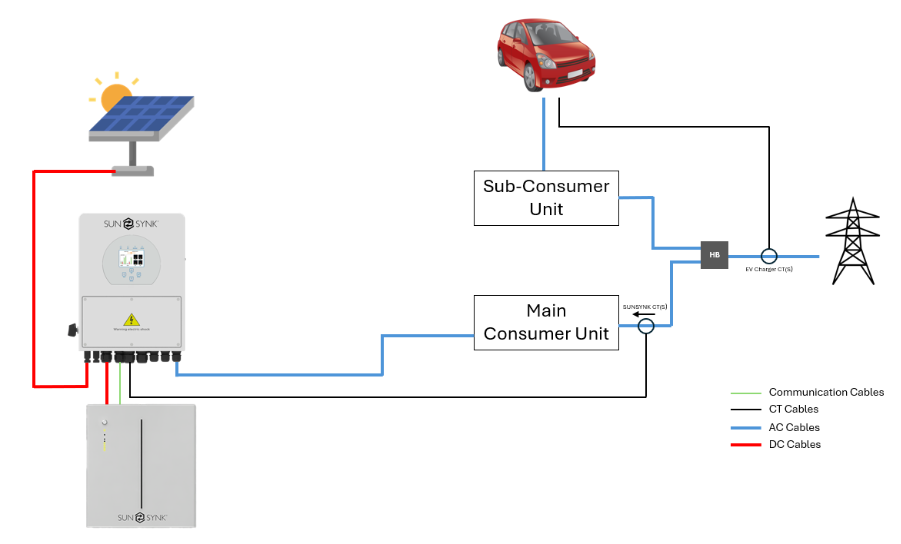
Splitting the live tails coming from your meter using a Henley block and connecting the EV charger to its own sub-consumer unit, allows the inverter CT to be positioned in a way that the EV charger is ‘hidden’ from the Sunsynk inverter and is no longer seen as a property load.
The Sunsynk inverter will only see the loads from the main consumer unit, therefore the batteries will cover these loads only.
Was this article helpful?
That’s Great!
Thank you for your feedback
Sorry! We couldn't be helpful
Thank you for your feedback
Feedback sent
We appreciate your effort and will try to fix the article