in Sunsynk Connect the Low Power Mode<Low Batt setting can be found towards the bottom of the Battery Settings menu
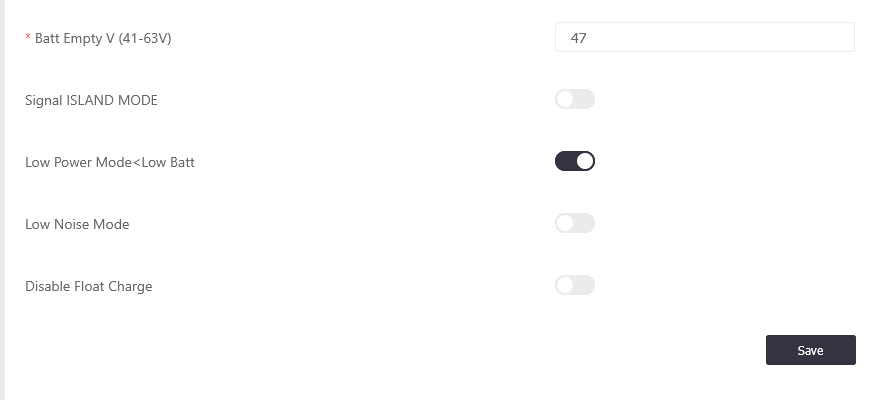
On the inverter screen it can be found in Advanced Settings>Other
With this setting enabled, when the battery SOC falls below the “Low Batt” threshold (in the Battery Settings menu) and there is no PV generation the inverter will switch to Low Power Mode.
When in this mode the inverter will stop powering non-essential/smart loads and will reduce the amount of power the inverter draws to power itself (quiescent current) down to almost nothing. This mode can be thought of as a 'hibernation' mode for your inverter. The current will still pass through the inverter to power any load on the property, but it will essentially bypass the inverter to keep power loss to a minimum, which is ideal for periods such as winter when there are longer periods of no sunlight.
When the inverter enters low power mode you will see the power and current readings just above the inverter icon in the power flow chart (on the inverter LCD screen) will show 0W/0A or very low readings to confirm that the inverter itself is drawing almost no power.
Configuration
The Grid Charge setting in the Battery Settings menu must be disabled otherwise it will force a grid charge rather than entering low power mode.
System timer settings must be at least 1% lower than Low Batt setting or it will prevent the system from entering low power mode. In order to prevent the system from flipping in and out of Low Power Mode it is best practice to keep more of a buffer between these values e.g. around 10% difference.
Exiting Low Power Mode
The inverter itself will come out of Low Power Mode when the PV starts generating again, or when the Low Power Mode Option is deselected. If deselecting it is advisable to reactive Grid Charge in the Battery Settings menu to avoid over discharging the batteries.
Was this article helpful?
That’s Great!
Thank you for your feedback
Sorry! We couldn't be helpful
Thank you for your feedback
Feedback sent
We appreciate your effort and will try to fix the article